The formula notebook

LaTeX Equation Examples

Start with a working formula. Browse LaTeX examples for matrices, fractions, integrals, probability, and multiline equations, then turn them into PNG, SVG, or JPG images.

Browse 30 examples, search by name or command, then copy the source or open it in the converter. Each example includes editing tips and a link you can share. New equations start as transparent PNG at 2× scale.

Search English or Chinese names and LaTeX commands. Category filters also apply.

30 examples

Every preview includes editable LaTeX source.

Quadratic formula

Algebra & fractions

Quadratic formula

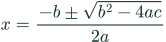
Use grouped braces for the numerator, denominator, and the expression under the square root.

x = \frac{-b \pm \sqrt{b^2 - 4ac}}{2a}
Editing tips & common mistakes
What to change
Replace a, b, and c consistently; a must be nonzero.
Watch out for
Keep the full discriminant inside the square root group.
Binomial expansion

Algebra & fractions

Binomial expansion

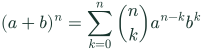
Combine a summation with a binomial coefficient. Change n to suit your expression.

(a+b)^n = \sum_{k=0}^{n} \binom{n}{k} a^{n-k}b^k
Editing tips & common mistakes
What to change
Choose a nonnegative integer n and replace a and b consistently.
Watch out for
Keep n−k together in braces so the entire expression becomes an exponent.
A simple fraction

Algebra & fractions

A simple fraction

A starter fraction for ratios and algebraic expressions.

\frac{a+b}{c+d}
Editing tips & common mistakes
What to change
Replace the expressions inside the first and second brace groups to change the numerator and denominator.
Watch out for
Keep both groups after the fraction command, even when either expression is a single character.
A nested fraction

Algebra & fractions

A nested fraction

Show a fraction inside another fraction, as used in continued fractions.

\frac{1}{1+\frac{1}{x}}
Editing tips & common mistakes
What to change
Replace x or add another fraction inside the denominator group.
Watch out for
Close the inner fraction before closing the outer denominator; each fraction needs two arguments.
Roots and subscripts

Algebra & fractions

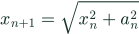
Roots and subscripts

Combine a square root, a power, and a multi-character subscript in a recurrence.

x_{n+1} = \sqrt{x_n^2 + a_n^2}
Editing tips & common mistakes
What to change
Change the terms under the root; replace the n+1 subscript with your desired index.
Watch out for
Wrap a multi-character subscript or superscript in braces, or only its first character will be attached.
Gaussian integral

Calculus

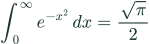
Gaussian integral

Place lower and upper bounds on the integral, with a small space before the differential.

\int_0^\infty e^{-x^2}\,dx = \frac{\sqrt{\pi}}{2}
Editing tips & common mistakes
What to change
Use the integral and fraction structure as a template for your own expression.
Watch out for
If you change the bounds or integrand, the displayed equality may no longer hold.
A trigonometric limit

Calculus

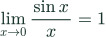
A trigonometric limit

Use the limit operator and a fraction to keep the approach value and ratio legible.

\lim_{x \to 0} \frac{\sin x}{x} = 1
Editing tips & common mistakes
What to change
Change the approach value and function together to write a new limit.
Watch out for
The value 1 is specific to this expression with angles in radians.
The power rule

Calculus

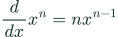
The power rule

Write an ordinary derivative using a fraction and a power.

\frac{d}{dx} x^n = n x^{n-1}
Editing tips & common mistakes
What to change
Change n consistently on both sides; this example treats n as a constant.
Watch out for
Use a fraction for the derivative rather than placing dy and dx next to each other.
A partial derivative

Calculus

A partial derivative

Differentiate a function of two variables with respect to x.

f(x,y)=x^2y \qquad \frac{\partial f}{\partial x}=2xy
Editing tips & common mistakes
What to change
Change the function and its derivative together; y is held constant here.
Watch out for
Use the partial symbol for both numerator and denominator of the derivative operator.
A double integral

Calculus

A double integral

Express integration over the unit square as two iterated integrals.

\iint_{[0,1]^2} xy\,dA = \int_0^1 \int_0^1 xy\,dx\,dy
Editing tips & common mistakes
What to change
Change the bounds, region, and integrand together; the rightmost differential is integrated first.
Watch out for
Keep the order of the bounds consistent with dx and dy when describing a different region.
A 2 × 2 matrix

Matrices

A 2 × 2 matrix

The bmatrix environment adds square brackets. Use & between columns and two backslashes between rows.

A = \begin{bmatrix} 1 & 2 \\ 3 & 4 \end{bmatrix}
Editing tips & common mistakes
What to change
Replace the four entries, or open the matrix generator for a larger grid.
Watch out for
The opening and closing matrix environment names must match.
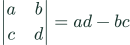
A 2 × 2 determinant

Matrices

A 2 × 2 determinant

The vmatrix environment uses vertical bars around the entries of a determinant.

\begin{vmatrix} a & b \\ c & d \end{vmatrix} = ad-bc
Editing tips & common mistakes
What to change
Replace a, b, c, and d consistently on both sides.
Watch out for
The value is ad−bc, not ad+bc; vertical bars here denote a determinant.
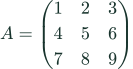
A 3 × 3 matrix

Matrices

A 3 × 3 matrix

Display nine entries with round matrix brackets.

A = \begin{pmatrix} 1 & 2 & 3 \\ 4 & 5 & 6 \\ 7 & 8 & 9 \end{pmatrix}
Editing tips & common mistakes
What to change
Replace the nine entries. Switch pmatrix to bmatrix at both ends for square brackets.
Watch out for
Each row needs three entries, separated by two ampersands; use two backslashes between rows.
A column vector

Matrices

A column vector

Stack three components in a single column.

\mathbf{v} = \begin{bmatrix} x \\ y \\ z \end{bmatrix}
Editing tips & common mistakes
What to change
Change x, y, and z, or add a row using two backslashes.
Watch out for
Use row breaks rather than ampersands; an ampersand would start a second column.
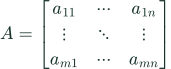
A general m × n matrix

Matrices

A general m × n matrix

Use horizontal, vertical, and diagonal dots to indicate omitted entries.

A = \begin{bmatrix} a_{11} & \cdots & a_{1n} \\ \vdots & \ddots & \vdots \\ a_{m1} & \cdots & a_{mn} \end{bmatrix}
Editing tips & common mistakes
What to change
Change m and n to describe your matrix dimensions and update the corner indices.
Watch out for
Keep the three visible columns aligned; use the appropriate dot command for each direction.
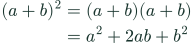
An aligned derivation

Multiline & cases

An aligned derivation

Align both lines at the equals sign using &. Each pair of backslashes starts a new row.

\begin{aligned}
(a+b)^2 &= (a+b)(a+b) \\
&= a^2 + 2ab + b^2
\end{aligned}
Editing tips & common mistakes
What to change
Change the derivation while keeping each alignment mark before the equals sign.
Watch out for
Use the pair of backslashes for a new row; a plain editor newline is not enough.
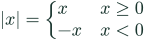
A piecewise function

Multiline & cases

A piecewise function

The cases environment places values beside their conditions under a single left brace.

|x| = \begin{cases}
x & x \ge 0 \\
-x & x < 0
\end{cases}
Editing tips & common mistakes
What to change
Replace the values and conditions on either side of each ampersand.
Watch out for
If you change the conditions, check that they still cover the intended domain.
A system of linear equations

Multiline & cases

A system of linear equations

Group two equations under a single left brace.

\begin{cases}
2x+y=5 \\
x-y=1
\end{cases}
Editing tips & common mistakes
What to change
Replace the coefficients and constants, or add another equation as a new row.
Watch out for
Match the cases environment at both ends and use two backslashes to separate equations.
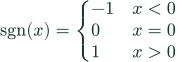
A three-part piecewise function

Multiline & cases

A three-part piecewise function

Define the sign function with negative, zero, and positive branches.

\operatorname{sgn}(x) = \begin{cases}
-1 & x<0 \\
0 & x=0 \\
1 & x>0
\end{cases}
Editing tips & common mistakes
What to change
Edit each value on the left of the ampersand and its condition on the right.
Watch out for
Keep the conditions complete and non-overlapping when defining a different function.
A long equation over two lines

Multiline & cases

A long equation over two lines

Split a wide polynomial expansion into readable aligned lines.

\begin{aligned}
(a+b+c)^2 &= a^2+b^2+c^2 \\
&\quad +2ab+2ac+2bc
\end{aligned}
Editing tips & common mistakes
What to change
Choose a break between terms, then start the continuation after an ampersand.
Watch out for
A plain editor newline will not break the formula; include the pair of backslashes.
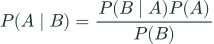
Bayes’ theorem

Probability

Bayes’ theorem

Use a conditional bar inside each probability. This identity assumes P(B) is greater than zero.

P(A\mid B) = \frac{P(B\mid A)P(A)}{P(B)}
Editing tips & common mistakes
What to change
Replace event names consistently in all probabilities.
Watch out for
The denominator must be nonzero; the conditional bar is not a division slash.
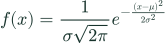
Normal probability density

Probability

Normal probability density

Nested fractions, Greek letters, and an exponent describe the density for a positive standard deviation.

f(x) = \frac{1}{\sigma\sqrt{2\pi}} e^{-\frac{(x-\mu)^2}{2\sigma^2}}
Editing tips & common mistakes
What to change
Set the mean and a positive standard deviation; use the same symbols throughout.
Watch out for
Keep the full negative fraction inside the exponent group.
The sample mean

Probability

The sample mean

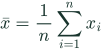
Use an overbar and a summation to show the average of n observations.

\bar{x} = \frac{1}{n}\sum_{i=1}^{n} x_i
Editing tips & common mistakes
What to change
Change the sample symbol or the index consistently; n is a positive observation count.
Watch out for
Place the summation limits in braces and include the factor 1/n.
Variance as an expectation

Probability

Variance as an expectation

Use blackboard-bold expectation symbols and paired scalable brackets.

\operatorname{Var}(X) = \mathbb{E}\!\left[(X-\mathbb{E}[X])^2\right]
Editing tips & common mistakes
What to change
Replace X consistently with the random variable in your problem.
Watch out for
This is the variance of a random variable, not the sample variance formula with an n−1 denominator.
Binomial probability

Probability

Binomial probability

Show the probability of k successes in n independent Bernoulli trials.

P(X=k) = \binom{n}{k} p^k(1-p)^{n-k}
Editing tips & common mistakes
What to change
Set n, k, and p; n is a nonnegative integer, 0 ≤ k ≤ n, and 0 ≤ p ≤ 1.
Watch out for
Keep the second exponent as n−k; changing it to k gives a different expression.
Euler’s identity

Symbols & sets

Euler’s identity

A short example of superscripts and the Greek letter pi. Group the full exponent in braces.

e^{i\pi}+1=0
Editing tips & common mistakes
What to change
Use the superscript and Greek-letter commands as a template for related expressions.
Watch out for
Changing the constants can invalidate the identity, even if the source still renders.
Set intersection

Symbols & sets

Set intersection

Use escaped braces for a visible set, membership symbols, and a text command for words.

A \cap B = \{x \mid x \in A \text{ and } x \in B\}
Editing tips & common mistakes
What to change
Replace the set names and the membership conditions consistently.
Watch out for
Escape the visible braces; grouping braces alone do not print in the formula.
Common Greek letters

Symbols & sets

Common Greek letters

A compact reference for parameters used in mathematics and science.

\alpha,\ \beta,\ \gamma,\ \theta,\ \lambda,\ \mu,\ \sigma,\ \Omega
Editing tips & common mistakes
What to change
Copy the command for the letter you need; upper- and lowercase commands can differ.
Watch out for
Commands are case-sensitive: uppercase Omega is different from lowercase omega.
Logic and quantifiers

Symbols & sets

Logic and quantifiers

Combine “for all”, “there exists”, membership, and logical conjunction.

\forall x \in \mathbb{R},\quad x^2 \ge 0 \quad \land \quad \exists y \in \mathbb{R}: y^2=2
Editing tips & common mistakes
What to change
Replace each statement while keeping the variable introduced by its quantifier.
Watch out for
Check the meaning of a quantifier when moving it; symbol placement can change the statement.
Common math fonts

Symbols & sets

Common math fonts

Compare blackboard bold, calligraphic, bold Latin, and bold Greek styles.

\mathbb{R}\quad \mathcal{F}\quad \mathbf{v}\quad \boldsymbol{\alpha}
Editing tips & common mistakes
What to change
Replace the letter inside each command to create number sets, functions, or vectors.
Watch out for
Use a bold-symbol command for Greek letters; the bold Latin command does not cover every math symbol.

Build your own structure

Need a custom matrix?

Edit a grid of up to 10 × 10 cells and export the matrix as an image.

Open matrix generator →

LaTeX table generator

Build tabular or booktabs source from cells or CSV. The preview shows the layout; this tool exports table code.

Open table generator →