PNG
Best for slides, LMS uploads, chats, and apps that need a normal image with optional transparency.
LaTeX to PNG ConverterRender LaTeX equations locally with MathJax, tune the background, scale, and color, then export clean PNG, JPG, or SVG images for slides, docs, and websites.
Type or paste a LaTeX equation.
Choose a formula, then type over the selected part.
Fine-tune appearance and export.
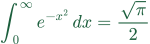
Scale changes the downloaded pixel dimensions.
Embed in text
Paste this code into a page's HTML to scale the image with the text and align its formula baseline. Plain image pasting uses the destination editor's alignment.
Render an equation, tune the appearance, then export or copy the image without uploading anything.
Type an equation, choose an example, or insert common symbols from the toolbar.
Pick PNG, SVG, or JPG, choose a background, set scale, and style the formula color.
Download an image, copy SVG markup, copy a PNG image, or share a URL with the same settings.
Formula rendering happens in your browser after MathJax loads. Your equation is not uploaded for conversion.
Use PNG for slides, SVG for documentation, and JPG for flat uploads that do not need transparency.
Keep equations clean on colored slides, design canvases, websites, and note themes.
Copy an image, SVG markup, LaTeX source, or a reusable URL without breaking your writing flow.
Each output format solves a different problem. Choose the one that matches the place where your equation will be used.
Best for slides, LMS uploads, chats, and apps that need a normal image with optional transparency.
LaTeX to PNG ConverterBest for websites, Markdown, READMEs, and documentation where formulas should stay sharp at any size.
LaTeX to SVG ConverterBest when a target system flattens uploads or does not accept transparent or vector images.
LaTeX to JPG ConverterCreate a matrix from editable cells, or turn spreadsheet data into table code before using it in a document.
Use equation images when the destination cannot reliably render raw LaTeX or MathJax.
Turn formulas and derivations into PNG images for homework portals, study notes, and flashcards.
Create transparent equation images for slides, worksheets, answer keys, and online lessons.
Export stable formula images for posters, draft annotations, peer review notes, and presentations.
Copy SVG equations into READMEs, documentation, issue comments, and technical blog posts.
Match formulas to a brand system with colors, gradients, scale, and transparent backgrounds.
Prepare math images for newsletters, explainers, course pages, and CMS tools that do not support LaTeX.
Answers about LaTeX to PNG, SVG, and JPG, transparent backgrounds, browser-local rendering, and common errors.
Yes. Choose PNG as the export format, adjust background and scale, then download or copy the rendered equation image.
Yes. Select SVG when you need a crisp vector equation for websites, Markdown, READMEs, documentation, or design tools.
Yes. Choose JPG (JPEG) to download a .jpg file. The image uses JPEG encoding; if a form requires a .jpeg extension, rename the downloaded file.
No. The converter renders LaTeX with MathJax in your browser and exports images locally. Recent formulas are stored only in this browser.
Yes. Keep the background set to Transparent and export PNG or SVG for formulas that sit cleanly on slides, documents, and web pages.
The most common causes are unclosed braces, mismatched begin/end environments, or commands outside MathJax's supported TeX packages.
No. It is a MathJax-based equation renderer for image export. It does not compile full .tex documents, TikZ, arbitrary packages, OCR, or PDF output.
Yes. You can convert LaTeX to PNG, SVG, or JPG online in this browser-based tool. The equation is rendered locally with MathJax and exported without uploading the formula for conversion.
Subscripts and fractions extend below the formula baseline. Use Copy HTML to get an embedded PNG, SVG, or JPG with a vertical-align offset calculated from the formula depth. The code scales the image with the surrounding text, while raster scale controls pixel resolution. Copy SVG preserves baseline styles for inline SVG. An SVG used as an image still needs alignment on the outer image element. Word, Markdown, and CMS editors may filter HTML or styles, so check their alignment controls when pasting an ordinary image.
Find LaTeX To Image on these independent tool directories.