
Scales without pixel blur
Vector output stays sharp in narrow mobile articles, wide docs pages, high-resolution screens, and presentation canvases.
Convert LaTeX to SVG locally for crisp, scalable equations in websites, Markdown, docs, and design tools. Download the vector file or copy SVG instantly.
Type or paste a LaTeX equation.
Choose a formula, then type over the selected part.
Fine-tune appearance and export.
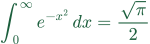
SVG downloads ignore scale. Copy image uses the shown scale for PNG.
Embed in text
Paste this code into a page's HTML to scale the image with the text and align its formula baseline. Plain image pasting uses the destination editor's alignment.
SVG is the strongest choice when a formula needs to stay crisp at any size or be copied as markup into technical publishing workflows.
Use SVG when clarity, responsiveness, and vector-friendly workflows matter more than universal upload compatibility.
Vector output stays sharp in narrow mobile articles, wide docs pages, high-resolution screens, and presentation canvases.
Copy SVG when a documentation system, static site, or code workflow accepts inline vector markup.
SVG can sit naturally on page backgrounds, design boards, and themed documentation without flattening to a fixed canvas.
Render locally with MathJax, confirm the formula, then choose whether you need a file or copied SVG markup.
Remove full document preambles and paste only the formula or math environment you want to export.
Choose a formula color that has enough contrast against the page, docs theme, or design canvas where the SVG will appear.
Download for asset libraries and design tools, or Copy SVG when your docs or code workflow accepts markup.
SVG is vector output, so choose settings around markup use, contrast, and destination policy.
SVG markup / transparent background
Copy SVG or download the file, then control display width in the destination with CSS or editor image sizing.
SVG file / final formula color
Set color before export so the imported vector matches the surrounding design system.
Check SVG policy first
Some CMS tools remove or block SVG for security reasons; use PNG if the platform strips the markup.
Format-specific answers for vector equation exports and copied SVG markup.
SVG stays sharp as the displayed size changes. PNG is often easier to upload, but SVG is better for responsive pages and long-term docs.
Only if your Markdown renderer or documentation system allows inline SVG. If it strips SVG, download the file or export PNG instead.
No. It exports MathJax-compatible equations and common math environments, not full TeX projects, TikZ, or arbitrary packages.
Not always. Some platforms block SVG uploads or strip inline SVG markup for security reasons. If that happens, use a downloaded SVG file if allowed or export PNG instead.
Set the displayed width in the destination with CSS, Markdown image sizing, or editor controls. Avoid editing the generated SVG internals unless you know the target system requires it.
Treat copied SVG as markup and review it before committing, just as you would review HTML. The export is generated locally, but your repository or CMS policy still decides what is allowed.
Some destinations reject SVG even when vector output would look better.