
Transparent PNG backgrounds
Place a LaTeX equation on colored slides, dark notes, worksheets, and design layouts without adding a white box around the formula.
Convert LaTeX to PNG online with transparent backgrounds, custom colors, and up to 4x scale. Render locally, then download or copy the PNG—no server upload.
Type or paste a LaTeX equation.
Choose a formula, then type over the selected part.
Fine-tune appearance and export.
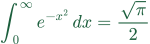
Scale changes the downloaded pixel dimensions.
Embed in text
Paste this code into a page's HTML to scale the image with the text and align its formula baseline. Plain image pasting uses the destination editor's alignment.
Use this LaTeX to PNG converter to turn MathJax-compatible equations into crisp PNG images in your browser. Choose transparency, color, and up to 4x scale, then download or copy the result without uploading the formula.
PNG combines broad app compatibility with transparent backgrounds and sharp raster output, making it practical for slides, coursework, documents, and image uploads.
Place a LaTeX equation on colored slides, dark notes, worksheets, and design layouts without adding a white box around the formula.
Use the exported PNG in PowerPoint, Google Slides, Word, learning platforms, chats, CMS editors, and apps that do not render raw LaTeX.
Export at 2x, 3x, or 4x before resizing elsewhere so fractions, roots, matrices, and other fine details stay cleaner on screen and in print.
Paste an equation, check the local MathJax preview, choose the PNG appearance, then download the file or copy the image.
Paste MathJax-compatible LaTeX such as a fraction, matrix, integral, aligned equation, or other common mathematical notation.
Choose Transparent for overlays, White for uploads, Paper for worksheets, and 2x–4x scale when the image will be enlarged or printed.
Download a PNG file or use Copy image to paste the rendered equation directly into a compatible document, slide, or editor.
Match the background and scale to the place where the exported equation will appear.
Transparent / 2x or 3x
Keeps equation images clean over custom slide colors and preserves sharper edges after resizing.
White / 2x
Most learning platforms and assignment forms preview white-background PNG files predictably.
White or Paper / 3x or 4x
A higher scale helps dense notation stay readable when inserted into a document, printed, or reduced.
Practical answers about transparent backgrounds, image quality, full .tex files, app compatibility, and browser-local PNG export.
Yes. Choose Transparent before exporting. The PNG keeps its alpha channel, so the surrounding PowerPoint slide, document, page, or note color can show through.
The image was probably exported too small and enlarged later. Export at 3x or 4x, then let the destination scale the larger PNG down to keep equation strokes cleaner.
Not directly. This tool converts MathJax-compatible equation snippets, not complete LaTeX documents with document classes, arbitrary packages, or TikZ. Paste the equation body without the document preamble.
Yes. PNG behaves like a normal image in both apps and can keep a transparent background. Export at 2x or 3x before placing it on a slide so later resizing does not soften the formula.
The PNG may still be transparent, but the destination app can preview, paste, or flatten transparent pixels onto white. Download the file and insert it directly before changing the export format.
Yes. MathJax renders the equation in your browser and the PNG is created from that local result. The formula is not uploaded for conversion, although a shared URL can expose formula text in its parameters.
Compare image formats or read the complete workflow before choosing the final export.
Use SVG for websites, Markdown, README files, and formulas that must scale without blur.
Open toolUse JPG when an upload flow requires a flat image without transparency.
Open toolCompare PNG, SVG, and JPG, then choose the format that fits your document, slide, or website.
Open tool