
Flat background by design
Choose White, Black, or Paper before export so the final equation card has predictable contrast.
Convert LaTeX to JPG locally for forms, email, and apps that need a flat image. Choose a white, black, or paper background and download instantly.
Type or paste a LaTeX equation.
Choose a formula, then type over the selected part.
Fine-tune appearance and export.
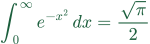
JPG needs a solid background; transparent switches to white.
Embed in text
Paste this code into a page's HTML to scale the image with the text and align its formula baseline. Plain image pasting uses the destination editor's alignment.
JPG uses JPEG encoding and works when a platform expects a flat image without transparency or SVG markup.
Use JPG when compatibility with simple upload flows matters more than transparency or vector scaling.
Choose White, Black, or Paper before export so the final equation card has predictable contrast.
JPG is a common choice for forms, older editors, email tools, and systems that reject SVG or transparent PNG.
A flat raster image is easy to attach, upload, or send when the receiving app has limited image support.
Pick the final canvas first, then export a flat image that matches the destination.
Use only the formula snippet and remove document-level LaTeX commands before rendering.
Use White for documents, Black for dark cards, or Paper for worksheet-style equation images.
Download the .jpg file. If a form requires .jpeg, rename the file before uploading.
JPG does not keep transparency, so choose a background and scale deliberately.
White / 2x
White matches the most common preview background in document and learning platforms.
Black / 3x
A dark canvas keeps light formula colors readable after export.
JPG / White or Paper
Download JPG and rename the file to .jpeg if the form checks that extension.
Format-specific answers for flat raster equation exports.
No. JPG is a flat image format. Pick White, Black, or Paper before exporting so the final background is intentional.
Yes. This tool downloads a .jpg file using JPEG encoding. Rename it to .jpeg if an upload form requires that extension.
Avoid JPG when you need transparency, crisp repeated resizing, or vector output. PNG or SVG will usually preserve formulas better.
JPG cannot store transparent pixels, so the export must be flattened onto a solid canvas. Choose White, Black, or Paper before download so the final contrast is intentional.
Yes. JPG is lossy, so very thin strokes can soften after export or after another app recompresses the file. Use a higher scale, and choose PNG when quality matters more.
Use JPG only when the form requires that extension or rejects transparency and SVG. If the form accepts PNG, PNG usually keeps equation edges cleaner.
The other formats are better when transparency or scaling is required.